Building Effective Feedback Loops in Product Teams
How to set up continuous collection, automated analysis, and integration of user feedback into the development backlog to multiply Time-to-Market speed.
Elena Rostova
VP of Product Growth & Sentiment Analytics Practitioner
Elena Rostova is a growth product manager and data analyst. She focuses on designing high-conversion micro-surveys, analyzing user feedback loops at scale using unsupervised clustering, and building robust churn-prevention scoring algorithms.
In modern rapid software development, Time-to-Market is critical. However, simply writing code fast and rolling it out to production is not enough. If you do not know how users react to changes, whether new functionality brings business value, and what technical difficulties they face, you are working “blind.”
The concept of Continuous Feedback is one of the three pillars of DevOps methodology and Agile management. The product team’s task is to shorten the path from an idea to obtaining a measurable market reaction.
In this article, we will examine in detail how to design, automate, and implement an effective feedback loop in a distributed product team, turning a chaotic stream of reviews into clear, prioritized backlog tasks.
1. Anatomy of the Perfect Feedback Loop
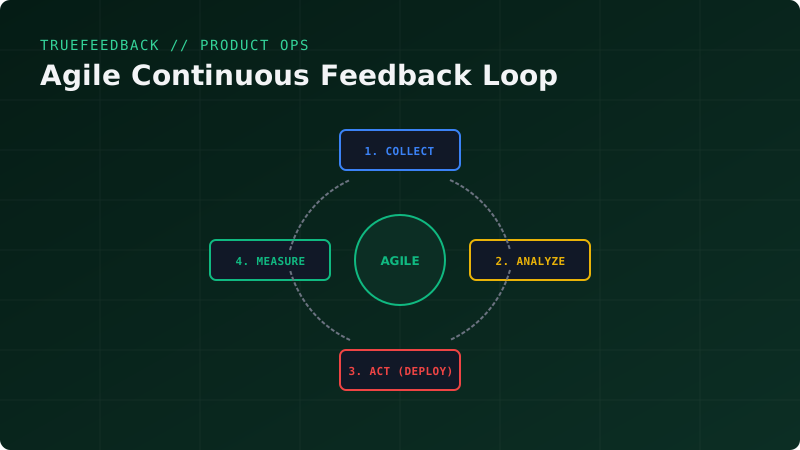
An effective Product Feedback Loop always consists of four sequential stages:
  ┌────────────────────────────────────────────────────────┐
  │                                                        │
  ▼                                                        │
  [1. COLLECT] (Collect) ──► [2. ANALYZE] (Analyze & Classify)
                                 │
                                 ▼
  [4. MEASURE] (Measure) ◄── [3. ACT] (Implement Changes)
1. Collect
Data collection should be carried out from several independent sources:
- Qualitative data: In-depth user interviews (UX research), support tickets, App Store / Google Play reviews, community discussions.
- Quantitative data: Product metrics (DAU/MAU, Retention, Churn Rate), business metrics (LTV, CAC), in-app surveys (NPS, CSAT, CES), and technical stability metrics (Crash Rate, API latency).
2. Analyze & Classify
Raw feedback is noise. During the analysis stage, the product manager must clear this noise by distributing reviews into categories:
- Bugs—require immediate fixing.
- UX Issues—require interface refinement.
- Feature Requests—require prioritization.
- Out-of-scope feedback—subject to deletion.
3. Act (Implementing Changes)
Integrating analysis results into the development workflow. Found bugs go directly into the current sprint, while features are prioritized using frameworks (RICE, WSJF) and added to the Product Roadmap.
4. Measure
After releasing changes, the loop closes. The team measures whether targeted metrics have improved (e.g., whether the number of support requests for this problem decreased or NPS grew). The results of the changes must be communicated back to users (Closing the Loop principle).
2. Automating Qualitative Feedback Collection: Building a Python Microservice
Interviews are good, but slow. To collect feedback continuously and at scale, you must embed feedback forms directly into your application’s user interface.
Let’s write a lightweight microservice using Python and FastAPI that receives user feedback, automatically determines sentiment (positive/negative) using NLP, and sends an alert to the product team’s Telegram channel.
Install the dependencies:
pip install fastapi uvicorn pydantic textblob requestsMicroservice code feedback_receiver.py:
import os
import requests
from fastapi import FastAPI, HTTPException
from pydantic import BaseModel
from textblob import TextBlob

app = FastAPI()

TELEGRAM_BOT_TOKEN = os.environ.get("TELEGRAM_BOT_TOKEN", "your_bot_token")
TELEGRAM_CHAT_ID = os.environ.get("TELEGRAM_CHAT_ID", "your_chat_id")

class FeedbackInput(BaseModel):
    user_id: str
    email: str
    feedback_text: str
    page_url: str

def analyze_sentiment(text):
    """
    Automated text sentiment analysis.
    Returns status: POSITIVE, NEUTRAL, NEGATIVE
    """
    analysis = TextBlob(text)
    # Polarity from -1 (very negative) to 1 (very positive)
    if analysis.sentiment.polarity > 0.1:
        return "POSITIVE 🟢"
    elif analysis.sentiment.polarity < -0.1:
        return "NEGATIVE 🔴"
    return "NEUTRAL 🟡"

def send_telegram_alert(feedback_data, sentiment):
    message = f"""
📣 *New Product Feedback!*
👤 *User:* {feedback_data.user_id} ({feedback_data.email})
📍 *Page:* {feedback_data.page_url}
🧠 *Sentiment:* {sentiment}

💬 *Feedback Text:*
"{feedback_data.feedback_text}"
"""
    url = f"https://api.telegram.org/bot{TELEGRAM_BOT_TOKEN}/sendMessage"
    payload = {
        "chat_id": TELEGRAM_CHAT_ID,
        "text": message,
        "parse_mode": "Markdown"
    }
    try:
        requests.post(url, json=payload, timeout=5)
    except Exception as e:
        print(f"[-] Telegram dispatch error: {e}")

@app.post("/api/v1/feedback")
def receive_feedback(data: FeedbackInput):
    if not data.feedback_text.strip():
        raise HTTPException(status_code=400, detail="Feedback text cannot be empty")

    # Analyze feedback sentiment
    sentiment = analyze_sentiment(data.feedback_text)

    # Send instant team alert
    send_telegram_alert(data, sentiment)

    # In reality, this is where saving to PostgreSQL/ClickHouse database happens
    return {"status": "success", "sentiment": sentiment}
3. Integrating Feedback into the Agile Process (Scrum/Kanban)
To prevent feedback from gathering dust in Excel spreadsheets, the product team must establish a strict routine for processing it during standard Agile events.
1. Weekly Feedback Triage
The Product Owner, together with the support lead, conducts a weekly review of new feedback:
- All verified bugs are sent directly to the technical backlog.
- Complex architectural issues or new feature requests are grouped into Epics.
2. Backlog Prioritization via the RICE Framework
To select the most valuable features, use the RICE formula:
RICE = (Reach * Impact * Confidence) / EffortWhere:
- Reach: How many users will benefit from this feature over a quarter? (Estimated from feedback analytics).
- Impact: How much will this improve their experience? (3 — massive, 1 — moderate, 0.25 — minimal).
- Confidence: How sure are we of our estimates? (100% — high confidence supported by user interviews, 50% — low).
- Effort: How many person-months will development require?
3. Sprint Retrospective
Use user feedback as a focus for retrospectives. Instead of abstract “what went well/badly” discussions, bring the top 5 user complaints from the past sprint to the meeting. Ask the team: “How did our technical decisions or processes lead to these five customer complaints, and how can we address this in the upcoming sprint?”
4. Closing the Loop: Why Responding to Users Matters
The biggest mistake product teams make is acting like a “black hole.” A user spends time writing a detailed bug report or suggestion, hits submit, and receives only a generic automatic reply: “Thank you, your feedback is valuable to us.” If nothing changes after that, they lose loyalty and churn.
Closing the Loop means returning to the user with a solution:
- Send a personalized email: “Hi! Last month you complained about slow report loading times. We rewrote the generation engine, and they now open 3x faster. Give it a try!”
- Maintain a public Changelog highlighting user-driven changes, showing that the product evolves directly from their feedback.
Conclusion
Building a continuous feedback loop is not just a technical task of setting up software, but a cultural transformation of the team. When developers, QA engineers, and product managers see real user pain in real time, the quality of technical solutions rises dramatically, and the product begins to evolve in precise alignment with market needs.
Read more reviews & reputation guides on the TrueFeedback blog.
Related Posts
Reducing SaaS Churn via Automated Exit Interview Analytics
Using dynamic micro-surveys at the point of cancellation, analyzing churn patterns in real-time, and deploying automated downsells or win-back campaigns.
Quantifying Qualitative Feedback with Multi-Language Sentiment Trends
Implementing high-performance sentiment-scoring pipelines using multilingual BERT models, plotting sentiment velocity, and triggering alerts on negative drops.
A Practical Guide to Selecting and Decomposing Your North Star Metric
How to identify your product's primary metric that simultaneously reflects user value and drives long-term financial business growth.
Implementing Real-Time NPS Analytics with ClickHouse and FastAPI
How to build a low-latency feedback ingestion pipeline, compute Net Promoter Scores on the fly, and render live trends using ClickHouse materialized views.
Optimizing Feedback Loops for High-Performing Teams
How to build deterministic feedback loops that improve software quality, team dynamics, and product-market fit.
On this page
Category
product-opsRelated Posts
Reducing SaaS Churn via Automated Exit Interview Analytics
Using dynamic micro-surveys at the point of cancellation, analyzing churn patterns in real-time, and deploying automated downsells or win-back campaigns.
Quantifying Qualitative Feedback with Multi-Language Sentiment Trends
Implementing high-performance sentiment-scoring pipelines using multilingual BERT models, plotting sentiment velocity, and triggering alerts on negative drops.
A Practical Guide to Selecting and Decomposing Your North Star Metric
How to identify your product's primary metric that simultaneously reflects user value and drives long-term financial business growth.
Implementing Real-Time NPS Analytics with ClickHouse and FastAPI
How to build a low-latency feedback ingestion pipeline, compute Net Promoter Scores on the fly, and render live trends using ClickHouse materialized views.
Optimizing Feedback Loops for High-Performing Teams
How to build deterministic feedback loops that improve software quality, team dynamics, and product-market fit.